


Download Writesonic – AI‑Powered Content Creator for SEO, Blogs & Marketing
Overview
Writesonic is a browser‑based AI writing assistant designed to turn a simple prompt into fully‑optimized, ready‑to‑publish content. Targeted at sales and marketing professionals, copywriters, and even students, the platform leverages state‑of‑the‑art language models to generate blog posts, product descriptions, landing‑page copy, and long‑form essays in seconds. What sets Writesonic apart from traditional word‑processing suites like Microsoft 365 is its focus on search‑engine optimisation (SEO).
Users only need to type a topic, choose a primary keyword, and the AI crafts a draft that respects keyword density, readability scores, and meta‑tag recommendations. The interface is intentionally beginner‑friendly—no coding, no advanced settings—making it possible for anyone with basic internet access to produce high‑quality copy. Multilingual support for more than 25 languages expands its reach to global marketers, while built‑in editing utilities such as sentence expanders, paraphrasing tools, and content shorteners let users polish the output without leaving the platform.
In short, Writesonic functions like a scaled‑up, AI‑enhanced version of Google Docs, delivering speed, SEO focus, and creative flexibility in one secure, cloud‑hosted package.
Key Features that Power Your Content Strategy
- AI‑Generated Drafts: Instant creation of articles, ads, and social posts based on a simple keyword‑rich prompt.
- SEO Optimisation: Built‑in keyword analysis, meta‑description suggestions, and readability scoring to improve Google rankings.
- Multilingual Support: Write fluently in more than 25 languages, ideal for international SEO campaigns.
- Content Shortening & Expansion: One‑click utilities to condense long paragraphs or elaborate terse sentences.
- Paraphrasing Engine: Rewrites existing text while preserving meaning, helping avoid duplicate‑content penalties.
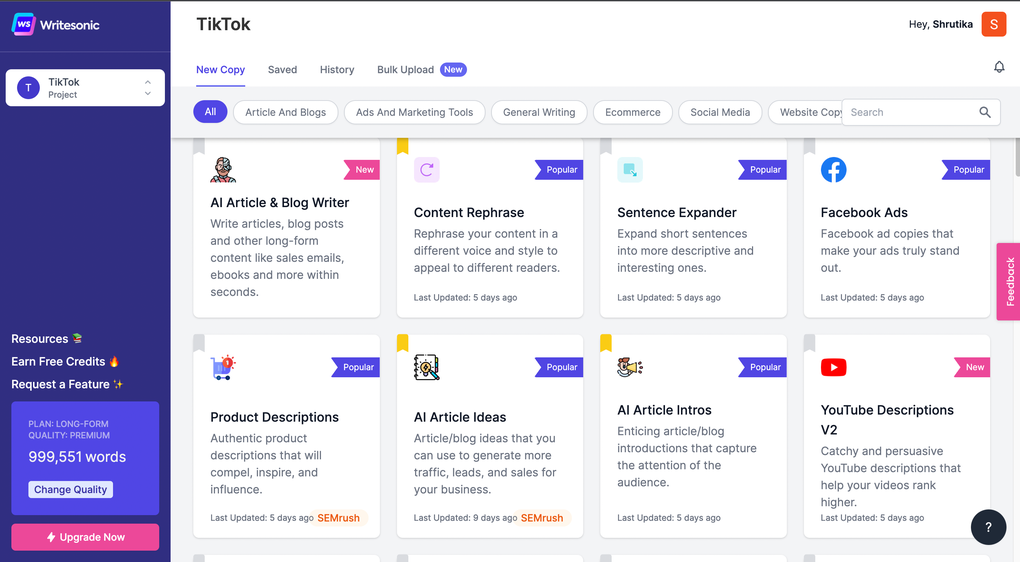
- Template Library: Pre‑made structures for blog outlines, product pages, email newsletters, and video scripts.
- Collaboration Mode: Share drafts with teammates, comment in real time, and track version history.
- Secure Cloud Storage: All projects are saved on encrypted servers, accessible from any device with an internet connection.
Each feature is built around the core promise of reducing the time‑to‑publish while keeping SEO best practices front‑and‑center. For example, the AI‑Generated Drafts module analyses the chosen keyword and automatically suggests sub‑headings that align with common search queries, effectively scaffolding the article before the first sentence appears. The multilingual engine isn’t a simple translation layer; it adapts tone and cultural nuances to ensure the copy feels native to each target market.
Meanwhile, the template library speeds up repetitive tasks—marketers can spin up a landing‑page in minutes instead of hours, thanks to pre‑filled sections for headlines, benefits, and calls‑to‑action that are already SEO‑tuned. The collaborative environment mirrors modern remote‑work workflows, allowing editors to leave feedback directly on the AI‑generated text, which the system can then re‑process based on the new instructions. All these capabilities converge to make Writesonic a versatile, all‑in‑one solution for anyone serious about scaling content without sacrificing quality.
Installation, Usage & Compatibility
Getting Started – No Download Required
Writesonic is a fully web‑based application, which means there is no traditional installer or desktop client to manage. To begin, visit writesonic.com, create a free account, and verify your email address. The onboarding wizard walks you through setting your preferred language, default tone (e.g., professional, conversational, witty), and connecting any third‑party tools such as WordPress or HubSpot if you plan to push content directly to a CMS. Because everything runs in the browser, the platform works on any modern OS that supports Chrome, Firefox, Edge, or Safari.
Step‑by‑Step Workflow
1. Define Your Prompt: Type a brief description of the topic (minimum five words) and select a primary keyword from the dropdown list.
2.
Choose a Template: Pick a format—blog post, product description, ad copy, etc.
3. Generate Draft: Click “Create” and let the AI compose a first draft in 10‑30 seconds.
4. Edit & Optimize: Use the built‑in shortener, expander, or paraphraser to refine tone, length, or style. The SEO panel shows real‑time keyword density and readability scores.
5. Export or Publish: Download as .docx, copy to clipboard, or push directly to a connected website.
Supported Operating Systems
- Windows 10/11 (any modern browser)
- macOS 11+ (Safari, Chrome, Firefox)
- Linux distributions with up‑to‑date browsers
- iOS 13+ (Safari/Chrome mobile)
- Android 9+ (Chrome/Edge mobile)
Because Writesonic runs entirely in the cloud, performance depends more on internet speed than on local hardware. A stable broadband connection (minimum 5 Mbps) ensures smooth generation and instant saving of drafts. Mobile users can enjoy the same feature set on tablets or phones, making it easy to draft ideas on the go.
Pros, Cons & Frequently Asked Questions
Pros
- Lightning‑fast content generation saves hours of manual writing.
- Built‑in SEO tools keep keywords, meta data, and readability in check.
- Supports 25+ languages, ideal for global marketing teams.
- Intuitive UI requires no technical background.
- Secure cloud storage with end‑to‑end encryption.
- Flexible pricing plans, including a free tier for light users.
Cons
- Heavy reliance on internet connectivity; offline editing not possible.
- Advanced customization (e.g., brand voice training) is only available on higher‑priced plans.
- While AI quality is high, complex technical topics may need extra human review.
- Export options are limited to common formats; native integration with some niche CMS platforms is missing.
Frequently Asked Questions
-
Is Writesonic really free to use?
Writesonic offers a free tier that allows up to 10 credits per month, enough for short articles or testing the platform. Paid plans start at $15 per month and unlock unlimited credits, advanced templates, and priority support.
-
Can I trust the SEO recommendations?
The SEO module follows Google’s current best practices, including keyword density, LSI terms, and meta‑description length. While it provides a solid baseline, it’s still advisable to run final checks with tools like Ahrefs or SEMrush.
-
How does Writesonic handle data privacy?
All user data is encrypted in transit (TLS 1.2) and at rest. Writesonic complies with GDPR and CCPA, offering the option to delete all stored content permanently from the user dashboard.
-
Can I integrate Writesonic with my existing CMS?
Yes. Writesonic provides native integrations for WordPress, HubSpot, and Shopify. For other platforms, you can use the API to push content directly or export a .docx file and upload manually.
-
Is there a limit to the number of languages?
Writesonic currently supports 27 languages, ranging from English, Spanish, and French to less common languages like Vietnamese and Romanian. The list is updated quarterly as new models are added.
After a month of daily use, we rate Writesonic 4.5 out of 5 stars. The platform excels in speed, SEO integration, and multilingual support, making it a top choice for marketers who need to scale content production. Minor drawbacks include the need for a stable internet connection and limited offline capabilities, but these are outweighed by the overall productivity boost.
Conclusion & Call to Action
Writesonic has carved a niche at the intersection of AI writing and SEO optimization. Its browser‑based design removes the friction of software installation, while the intuitive prompt‑to‑publish workflow empowers both novices and seasoned copywriters to generate high‑quality, search‑engine‑friendly content in minutes. The multilingual engine opens doors to global audiences, and the suite of editing tools ensures that the AI‑generated draft can be refined to match brand voice without a steep learning curve. Although the reliance on an internet connection and the premium pricing for advanced features may be considerations for some, the overall value proposition—time saved, SEO compliance built‑in, and secure cloud storage—makes Writesonic a compelling addition to any digital marketing stack.
Ready to boost your content output and climb the SERPs? Sign up for a free account today and experience the power of AI‑driven writing. Upgrade to a paid plan when you’re ready to unlock unlimited credits, custom brand tones, and priority support. Your next high‑ranking article is just a prompt away.






